
Major Gifts Ramp-Up Command Center

MGRU CLOUD LIBRARY + TURBO SEARCH + FETCH THE FUNDRAISING DOG

Launch your Major Gifts Ramp-Up Campaign with the MGRU Cloud Library and Fetch the Fundraising Dog. Access 15,000 pages of proprietary campaign resources alongside an AI companion dedicated to the MGRU Model.

Find and adapt proven campaign materials, build your plans, and navigate all three phases and thirteen steps. Do it all with Fetch the Fundraising Dog by your side putting the steps into action!

Spend less time starting from scratch and more time building donor relationships to raise the millions your mission needs to save and transform more lives.

15,000 PAGES

Proprietary campaign resources

3 PHASES

One organized campaign model

13 STEPS

Resources for every step

35 YEARS

Campaign management experience

The Proprietary MGRU Difference:

You won’t find Fetch or the MGRU Cloud on ChatGPT, Claude, or Gemini

A document about major gifts fundraising is not the same as one developed to implement Major Gifts Ramp-Up.

The MGRU Cloud Library brings together proprietary materials created for thousands of nonprofits that successfully deployed MGRU Campaigns.

Including:

  • Case for support documents
  • Advancement calendars
  • Campaign leadership materials
  • Donor cultivation tools
  • Donor-specific major gift proposals
  • Organizational development plans
  • Campaign cabinet training agendas
  • Awareness & Signature event invitations
  • Email series & press releases
  • And more

These are working resources organized around the MGRU method, not unrelated templates gathered from the internet. With Fetch providing model-specific assistance, you gain more than fundraising information—you gain the materials and guidance to put Major Gifts Ramp-Up into action.

A document about major gifts fundraising is not the same as one developed to implement Major Gifts Ramp-Up.

The MGRU Cloud Library brings together proprietary materials created for thousands of nonprofits that successfully deployed MGRU Campaigns.

Including:

  • Case for support documents
  • Advancement calendars
  • Campaign leadership materials
  • Donor cultivation tools
  • Donor-specific major gift proposals
  • Organizational development plans
  • Campaign cabinet training agendas
  • Awareness & Signature event invitations
  • Email series & press releases
  • And more

These are working resources organized around the MGRU method, not unrelated templates gathered from the internet. With Fetch providing model-specific assistance, you gain more than fundraising information—you gain the materials and guidance to put Major Gifts Ramp-Up into action.

Actual campaign documents from the MGRU Cloud Library.

Your AI Companion Has One Specialty:

Major Gifts Ramp-Up.

Meet Fetch the Fundraising Dog, the AI Companion that accompanies the MGRU Cloud Library.

Fetch is built around the MGRU Model and its proprietary campaign knowledge. His assignment is to help you understand the method, work with the Library's resources, and move from a fundraising question to a practical next step.

Work with Fetch to develop drafts and practical next steps grounded in MGRU, then adapt them to your organization’s facts, goals, and circumstances.

Bring Fetch a real assignment:

“Help me outline a case for support for our ministry using the MGRU Model.”

“Help me design an awareness-event invitation relevant to a healthcare nonprofit.”

“Help me outline an MGRU plan for an organization with no major donors.”

You bring the mission, the facts, and the judgment. Fetch helps you work with the MGRU method and materials. Your team reviews and approves the finished work.

The Library provides the working resources. Fetch helps you put them to use.

Meet Fetch the Fundraising Dog, the AI Companion that accompanies the MGRU Cloud Library.

Fetch is built around the MGRU Model and its proprietary campaign knowledge. His assignment is to help you understand the method, work with the Library's resources, and move from a fundraising question to a practical next step.

Work with Fetch to develop drafts and practical next steps grounded in MGRU, then adapt them to your organization’s facts, goals, and circumstances.

Bring Fetch a real assignment:

“Help me outline a case for support for our ministry using the MGRU Model.”

“Help me design an awareness-event invitation relevant to a healthcare nonprofit.”

“Help me outline an MGRU plan for an organization with no major donors.”

You bring the mission, the facts, and the judgment. Fetch helps you work with the MGRU method and materials. Your team reviews and approves the finished work.

The Library provides the working resources. Fetch helps you put them to use.

15,000 Pages. Every Word Searchable.

A large library is valuable only when you can find what you need.

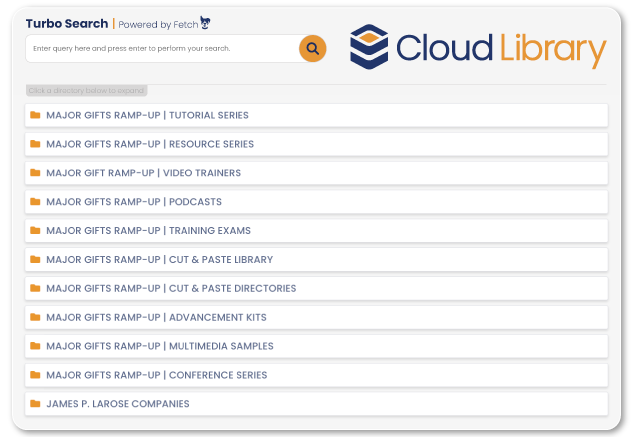
Turbo Search - Powered by Fetch searches the text within the Library’s 15,000 pages, helping you locate campaign materials beyond document titles.

Start with a few keywords:

  • Overseas ministry
  • Awareness event
  • Advancement calendar

For best results, keep searches short. If you don’t find what you need, try fewer words or different wording.

Have a more specific request? Ask Fetch. Describe what you’re trying to accomplish, and the AI Companion can provide links to relevant Library documents.

“Help me find a case for support for an overseas children’s ministry.”

Use Turbo Search to explore by keyword. Ask Fetch to help you find resources for a specific assignment.
Learn the MGRU Model. Put It to Work.

Two connected portals help your team understand Major Gifts Ramp-Up and carry it out through all three phases and thirteen steps of the MGRU Model.

TRAINING PORTAL

Learn through the MGRU Tutorial and Resource Series, Video Trainers, Podcasts, and Training Exams. Share resources with staff, board members, and volunteers to build a common understanding of the model. Watch recordings of actual events and major gift asks to see the method in practice.

WORKING PORTAL

Use the Cut & Paste Library, Advancement Kits, and Multimedia Samples to prepare documents and presentations for your own campaign. Explore examples, adapt relevant resources, and connect your team's learning to the next assignment.

You do not have to choose between learning the method and getting the work done. The Library supports both.

Three Phases. Thirteen Steps. One Campaign.

Major Gifts Ramp-Up guides your organization from initial planning to major gift invitations and campaign completion. The Cloud Library provides training and working resources for every step, helping your team move through each phase with a clear direction.
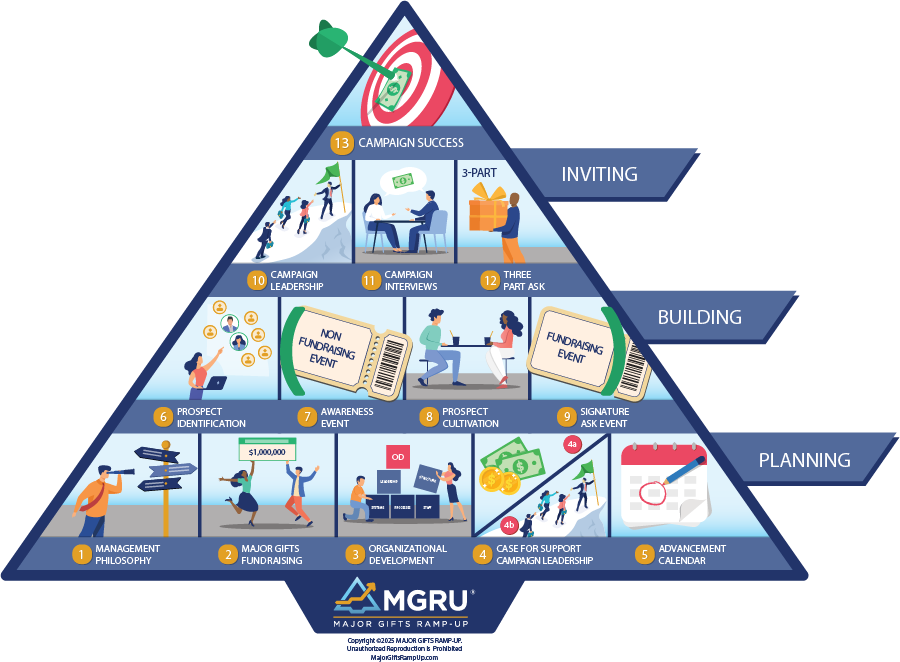
PLANNING | Steps 1-5

Prepare your organization and team, develop your case for support, and build an advancement calendar that organizes the work ahead.

BUILDING | Steps 6-9

Identify prospects, host awareness events, cultivate donor relationships, and prepare Ask Events that connect people with your mission.

INVITING | Steps 10-13

Equip campaign leaders, conduct interviews, prepare major gift solicitations, and bring your campaign to completion.

Your Next Campaign Starts Here.

Here's what nonprofit consultants charge for the resources you'll own with your MGRU Cloud Subscription:

Case Development Packages
$15,000

Organizational Development Packages
$20,000

Campaign Solicitation Packages
$25,000

Campaign Interview Packages
$30,000

Foundation Solicitation Packages
$10,000

Direct Mail Letter Copy Packages
$10,000

Board Development Packages
$10,000

Board Retreat Training Kits
$10,000

Awareness Event Packages
$10,000

Signature Event Packages
$10,000

Nonprofit Incorporation Startup
$8,000

MGRU Training Curriculum
$5,000

MGRU Training Pre/Post Tests
$3,000

MGRU Training Videos
$5,000

MGRU Training Audios
$3,000

TOTAL VALUE: $174,000

YOUR COST - ANNUAL SUBSCRIPTION FEE - ONLY $3,748

Explore Before You Subscribe.

Request your free preview to see sample campaign materials and explore the resources available for your nonprofit.

Would you like a guided tour?

Call 1-800-257-6670 to schedule a guided tour of the MGRU Cloud Library or purchase your subscription today!

"*" indicates required fields